
TL;DR: Tracking Google Ads Leads to Booked Jobs in ServiceTitan
Track beyond the first conversion. Connect Google Ads clicks to qualified calls, booked appointments, completed jobs, and revenue.
Configure the integration correctly. ServiceTitan's native setup requires Google Ads, Google Analytics 4, and dynamic number insertion (DNI).
Check your conversion settings. ServiceTitan's standard lead-call conversion is primary by default, while booked-job conversions are secondary.
Measure cost per booked job and customer acquisition cost. These numbers tell you more about advertising performance than cost per lead alone.
Verify the data before optimizing. Incorrect campaign mapping, missing click identifiers, and duplicate conversions can lead to bad budget decisions.
Your Google Ads account says you generated 40 conversions last month.
Great.
But how many of those people actually booked an appointment? How many jobs did your technicians complete? And how much revenue did those jobs produce?
If you can't answer those questions, you're making decisions about thousands of dollars in advertising spend with incomplete information.
This is something I pay close attention to when managing Google Ads for HVAC companies. Google might tell me a furnace repair campaign generated 20 conversions at $150 each, but that doesn't tell me whether those were qualified homeowners, people asking for prices, or actual jobs on the schedule.
A conversion isn't automatically a customer.
That's where connecting Google Ads and ServiceTitan becomes valuable.
With the right setup, you can follow a homeowner from their original Google search to their phone call, booked appointment, completed job, and revenue.
But simply connecting the two platforms isn't enough. You need to make sure the data is accurate and that Google Ads is optimizing toward the right outcomes.
In this guide, I'll explain how to track Google Ads leads to booked jobs in ServiceTitan, how the integration works, which conversions matter, and how to use that information to make smarter advertising decisions.
Why Google Ads Leads Don't Always Equal Booked Jobs
Let's say your HVAC company spends $3,000 on Google Ads. Google reports 30 conversions. That's a $100 cost per conversion. Seems pretty good, right?
Now you open ServiceTitan and discover that only 12 appointments were actually booked. Your cost per booked job is $250.
Same campaign. Same advertising budget. Two completely different ways of looking at performance. And it gets more interesting when you discover that only eight appointments became completed, sold jobs.
This is why I think businesses put too much emphasis on cost per lead.
I still track it. It's useful for understanding what you're paying to generate inquiries. But it's only one part of the picture.
As I explain in HVAC cost per booked job, the real question is how efficiently your marketing turns those inquiries into scheduled work.
What Google Ads Counts as a Conversion
Google Ads counts actions based on how you've configured conversion tracking.
That might include phone calls, form submissions, booked appointments, or completed jobs imported from another system.
These actions don't all have equal business value.
A 60-second phone call from someone outside your service area isn't worth the same as a booked furnace replacement estimate.
What ServiceTitan Counts as a Lead
ServiceTitan's Google Ads integration can classify several events as leads, including booked calls and certain unbooked calls lasting more than 60 seconds.
That means ServiceTitan may send a lead-call conversion to Google even when no appointment was scheduled.
That's not necessarily a tracking error.
It means lead tracking and booked-job tracking measure different stages of the customer journey.
How Google Ads and ServiceTitan Track a Customer From Click to Job
Here's an example of how the process should work.
Step 1: A Homeowner Clicks Your Google Ad
Someone searches “emergency furnace repair Denver.”
They click your Google Search ad and land on your furnace repair page.
With Google Ads auto-tagging properly configured, the visit can include a Google Click ID, also called a GCLID.
That identifier helps connect later activity to the advertising click.
Step 2: ServiceTitan Captures the Advertising Source
Your website uses dynamic number insertion, or DNI.
Instead of showing every visitor the same phone number, DNI displays a trackable number associated with their visit.
When the homeowner calls, ServiceTitan can associate the call with the Google Ads click and campaign.
Step 3: The Homeowner Calls Your Office
Your CSR answers and confirms the homeowner needs a furnace repair in your service area.
ServiceTitan records the call and its marketing attribution.
Step 4: Your Office Books the Appointment
The CSR schedules a technician.
Now you have something more valuable than a phone call.
You have a booked opportunity.
ServiceTitan can associate that booking with the original tracked interaction.
Step 5: The Technician Completes the Job
The technician diagnoses the furnace and completes an $850 repair.
The job is marked complete in ServiceTitan, with the revenue recorded.
Step 6: Revenue Is Connected to Google Ads
With the eligible Ads Optimizer setup, ServiceTitan can send the completed-job revenue back to Google Ads using the stored click identifier.
Now you can evaluate the advertising that produced the $850 job, rather than only the phone call.
That is the purpose of HVAC marketing attribution.
Important: This is a hypothetical example. Not every ServiceTitan subscription supports every tracking or revenue-import feature, and not every lead follows this exact path.
What You Need Before Connecting Google Ads to ServiceTitan
Before setting anything up, confirm what your ServiceTitan account supports.
ServiceTitan's current documentation identifies several requirements.
1. An Eligible ServiceTitan Package
The native Marketing Pro Ads integration requires account configuration.
Advanced features such as Ads Optimizer and Revenue Import require Marketing Pro with Ads enabled.
If you're unsure what your business has, contact your ServiceTitan account manager before purchasing additional tools.
There's a reason I recommend evaluating whether ServiceTitan is worth it for HVAC companies based on the features you'll actually use.
2. Google Ads and Google Analytics 4
You'll need access to the Google Ads account running your campaigns and the appropriate Google Analytics 4 property.
ServiceTitan documents Google Analytics and DNI as required parts of its complete Ads Measurement setup.
3. Dynamic Number Insertion
DNI connects website visitors to phone calls.
For home service companies, this is especially important because people often call instead of submitting forms.
Install the DNI script on every applicable website and landing page, not just your homepage.
4. Proper Form Tracking
Phone calls and website forms don't automatically follow identical attribution paths.
ServiceTitan supports attributed forms and bookings through specific API and Zapier integrations that provide the required click identifier.
If your website uses a basic contact form without the appropriate integration, don't assume those submissions will automatically appear as attributed ServiceTitan conversions.
How to Connect Google Ads to ServiceTitan: Step by Step
ServiceTitan provides an official Google Ads integration setup guide. Here's how I'd approach the setup and verification.
Step 1: Connect Your Google Ads Account
Inside ServiceTitan, navigate to:
Settings → Integrations → Marketing Integrations
Find Google Ads and select Configure.
Sign in with the Google account that has access to your advertising account, authorize the connection, and select the appropriate Google Ads account.
ServiceTitan also offers a setup path through its Marketing overview.
Step 2: Map Your Google Ads Campaigns
After connecting, ServiceTitan can create corresponding marketing campaigns using the names from Google Ads.
Auto-Map is enabled by default, although manual mapping is available.
I'd review these carefully, especially if you're managing multiple service areas, locations, or Google Ads accounts.
For example, your campaigns might include:
Furnace Repair | Denver
AC Repair | Denver
AC Installation | Denver
Swamp Cooler Repair | Denver
You want each campaign connected to the correct ServiceTitan marketing campaign.
Otherwise, your reports might show revenue under the wrong service or advertising source.
Step 3: Connect Google Analytics 4
In Marketing Integrations, configure Google Analytics and select the appropriate GA4 property.
This gives ServiceTitan another way to associate marketing activity with website traffic and lead events.
Step 4: Configure Dynamic Call Tracking
Find Dynamic Call Tracking (DNI) under Marketing Integrations.
Follow ServiceTitan's setup to register your website, configure tracking numbers, and install the provided JavaScript snippet.
Make sure the number displayed on your website matches the number configured for replacement, including click-to-call functionality.
If you have separate landing-page domains or websites for different locations, verify that each is covered.
ServiceTitan provides a built-in DNI test during setup.
Use it.
Step 5: Configure Forms, Bookings, and Calls From Ads
If you're using website forms or online booking tools, confirm that they pass the required attribution data through a supported integration.
For calls made directly from Google Ads call assets, review ServiceTitan's tracking-number and campaign-mapping requirements.
You should also check existing Google Ads call conversions to prevent counting the same interaction more than intended.
Step 6: Test the Full Customer Journey
Don't stop when the connection says it's active.
I'd verify that:
The correct Google Ads account and campaigns are connected.
DNI works on the actual landing pages.
Calls reach the correct office.
The correct marketing campaign appears in ServiceTitan.
Booked appointments retain their original attribution.
Eligible conversion events appear in Google Ads.
Completed-job revenue is imported when the account supports it.
Use ServiceTitan's test procedures and controlled validation. Don't generate unnecessary paid clicks or fake customer jobs.
Which ServiceTitan Conversions Should Google Ads Optimize For?
This might be the most important section of the entire article.
When you connect ServiceTitan, different actions can be sent to Google Ads.
Some are set as primary conversions, while others are secondary conversions.
Primary conversions can guide Google's automated bidding when their conversion goal is used by the campaign.
Secondary conversions generally remain available for observation without directly controlling bidding, except in certain custom-goal configurations.
Here are several conversion actions documented by ServiceTitan:
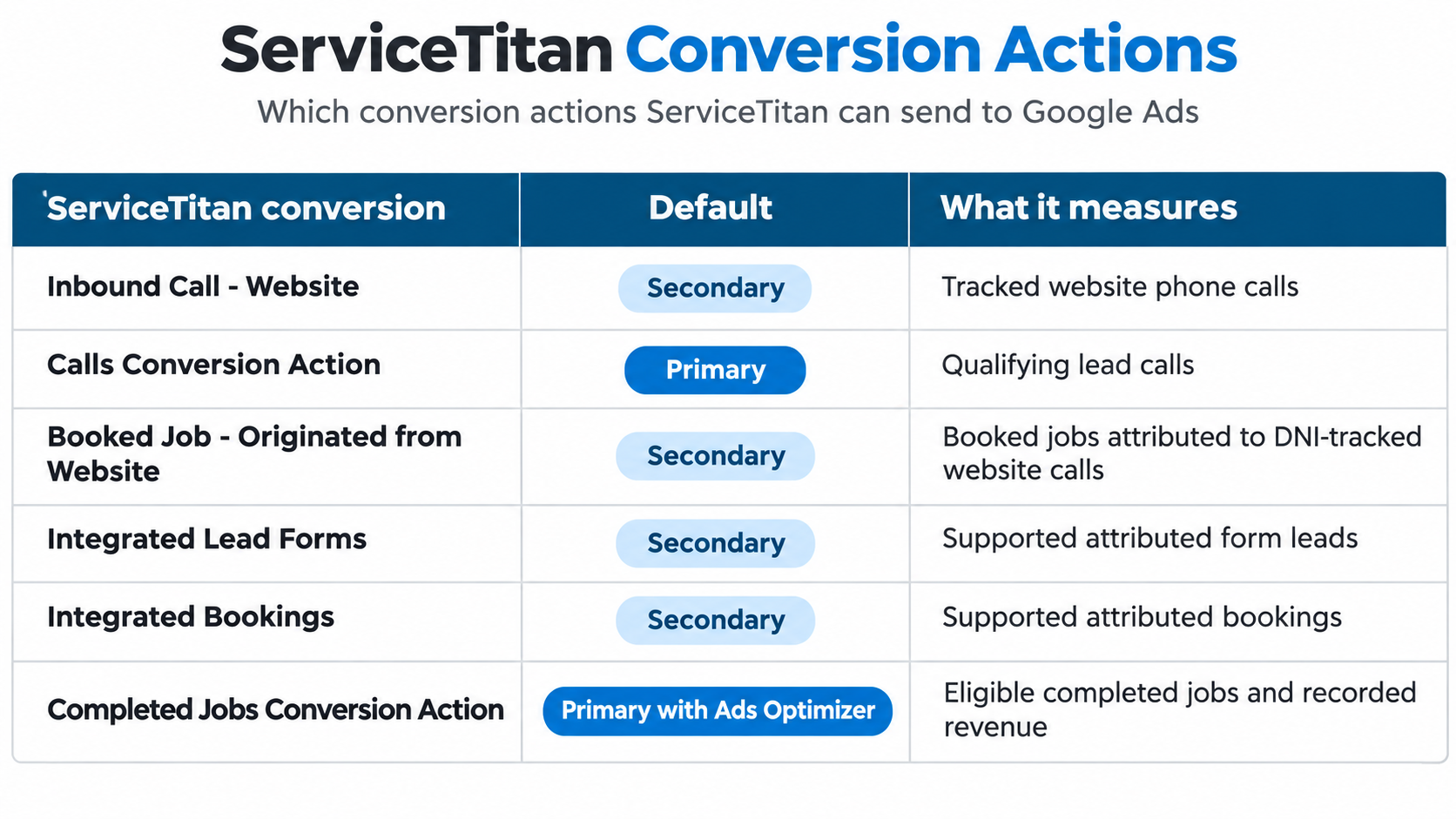
The last row depends on having the appropriate Ads Optimizer features enabled. Job Value Predictor can also change which revenue-related actions are primary.
Why These Settings Matter
Imagine Google Ads is optimizing toward calls lasting more than 60 seconds.
It might find people who are willing to talk.
But are they booking?
If one campaign produces 30 calls and five appointments, while another produces 20 calls and 15 appointments, the second campaign is probably providing more useful opportunities.
This is where HVAC call booking rate becomes important.
Should Booked Jobs Be Your Primary Conversion?
Sometimes.
But I wouldn't automatically switch every campaign to booked jobs the moment the integration goes live.
If you're only generating a handful of booked appointments each month, Google may have limited conversion data to learn from.
I'd first check the accuracy and volume of the booking events, identify any duplicate conversions, and review your bidding strategy.
Then I'd decide whether optimizing toward booked jobs or completed-job value makes sense.
You can review these settings in Google Ads → Goals → Conversions.
Google explains the distinction in its primary and secondary conversion documentation.
How to Calculate Google Ads ROI Using ServiceTitan
Once the data is connected, you can build a much more useful marketing report.
Here's a hypothetical monthly example for an HVAC company:
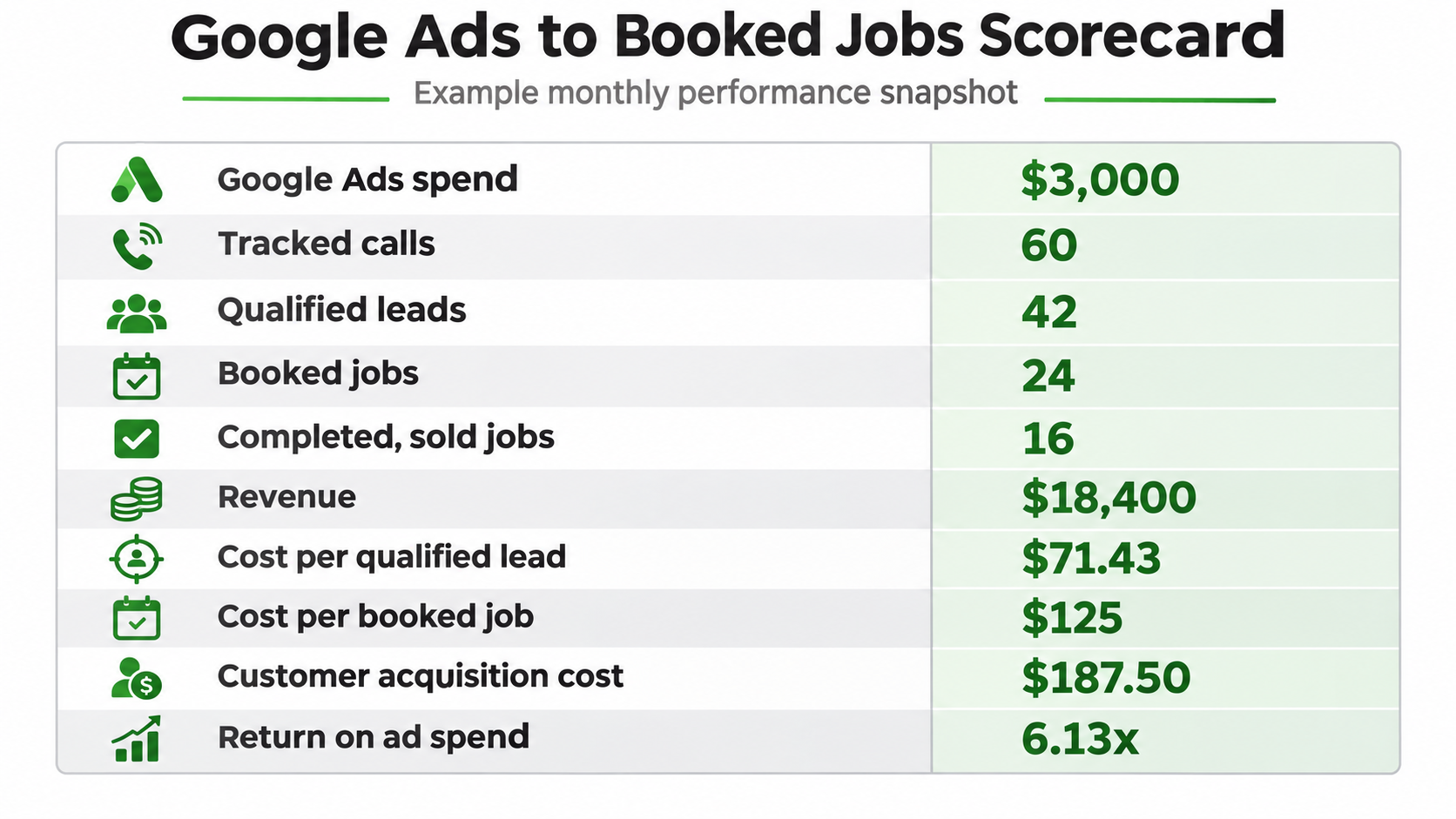
Cost Per Booked Job
Advertising Spend ÷ Booked Jobs
$3,000 ÷ 24 = $125 per booked job.
Customer Acquisition Cost
Advertising Spend ÷ New Customers Acquired
$3,000 ÷ 16 = $187.50 per acquired customer, assuming all 16 sold jobs represent new customers.
This is why HVAC customer acquisition cost matters more than simply reporting cheap leads.
Return on Ad Spend
Attributed Revenue ÷ Advertising Spend
$18,400 ÷ $3,000 = 6.13x ROAS.
But 6.13x ROAS doesn't mean the business earned 6.13x its advertising spend in profit.
You still need to account for equipment, parts, labor, and other job costs.
When evaluating HVAC marketing ROI, I'd calculate gross profit and compare it against the advertising investment.
Break Down Revenue by Service
I'd also separate furnace repair, AC repair, maintenance, and installation.
A $200 booked repair and a $200 booked replacement estimate have very different economics.
Blending everything together makes it difficult to know which services deserve more advertising budget.
Why Google Ads and ServiceTitan Numbers Don't Match
Even properly connected accounts won't always display identical totals.
But large or unexplained differences deserve investigation.
Google Ads Shows Calls, but ServiceTitan Shows Fewer Booked Jobs
First, determine whether those calls were actually qualified.
Were people asking about jobs? Calling from outside the service area? Asking for services you don't offer?
If the inquiries were qualified, review call recordings, missed calls, and booking outcomes.
It might not be a tracking problem. It might be a booking problem.
Google Click IDs Aren't Being Captured
Check whether auto-tagging is enabled, your landing pages retain Google click identifiers, and DNI is working correctly.
Watch for redirects or website changes that remove tracking information before a caller reaches the page.
Calls Are Assigned to the Wrong Campaign
Review your campaign mappings and ServiceTitan's attribution settings.
ServiceTitan also allows certain manual campaign changes, which can create differences between the campaign shown in the CRM and the original Google Ads attribution.
Google Ads Is Double-Counting Conversions
This can happen when several tracking systems record the same customer interaction.
For example, you might have Google Ads website-call tracking, imported GA4 conversions, and ServiceTitan call conversions all active.
Review which actions are primary and whether multiple actions represent the same event.
Don't remove legitimate tracking data just because the numbers overlap. Decide which action should guide bidding and keep useful supporting metrics for observation.
Revenue Appears on Different Dates
This one is easy to overlook.
ServiceTitan records completed-job revenue based on when the job is completed.
Google Ads can attribute imported revenue to the earlier advertising interaction.
A homeowner might click your ad on October 25 and complete a $9,000 installation on November 5.
The revenue can appear under different reporting dates even though both systems are describing the same job.
Compare equivalent attribution windows and use Google Ads' conversion-time reporting when appropriate.
ServiceTitan's revenue mismatch documentation explains other causes worth checking.
How to Track Google Local Services Ads in ServiceTitan
Google Search Ads and Google Local Services Ads are different products.
Search Ads typically charge for clicks and can send homeowners to your website.
Local Services Ads generally generate calls or messages directly from Google's listing experience.
That means their tracking paths are different.
ServiceTitan has introduced an integration that can capture certain Google LSA message leads, including Get Quote inquiries, directly in its CRM or Bookings.
However, ServiceTitan currently identifies that feature as Early Access for eligible accounts.
It also requires an existing Google Ads integration and specific mapping.
Don't assume connecting standard Search Ads automatically means every LSA call, message, and booking is tracked identically.
For a fuller comparison, see Google LSA vs Google Search Ads for HVAC businesses.
What If You Don't Have ServiceTitan Marketing Pro?
You can still measure booked jobs without buying every advanced integration.
I'd start with a simple reporting process.
Record the original marketing source when the customer calls. Keep that source connected to their booking and job record. Export your Google Ads spend and compare it with qualified leads, appointments, completed jobs, and revenue.
Third-party call tracking and offline conversion tools may also help, depending on your setup.
Google supports offline conversion imports and enhanced conversions for leads, although proper configuration and applicable privacy requirements matter.
You don't need to build the most complicated reporting system on day one.
You need consistent data that answers the questions important to your business.
Stop Tracking Google Ads Leads. Start Tracking Booked Jobs in ServiceTitan.
If your Google Ads account says you generated 50 conversions, that tells you something.
But it doesn't tell you whether those conversions made your HVAC company money.
That's why I recommend connecting your advertising to the actual work being booked and completed.
Start by confirming that Google Ads, ServiceTitan, GA4, and DNI are configured correctly. Make sure your campaigns are mapped, check which conversions Google is optimizing toward, and compare the data with actual booked and completed jobs.
Then use those numbers to make decisions.
Maybe furnace repair deserves more budget. Maybe your AC installation campaign is producing fewer leads but more revenue. Or maybe the real problem isn't Google Ads at all, but what happens when someone calls your office.
The goal isn't to make your Google Ads dashboard look better. It's to know exactly which advertising dollars are producing profitable work.
If you're spending thousands on Google Ads but can't connect that money to booked jobs, book a consultation with Schulze Creative. We'll discuss your campaigns, lead tracking, and where better attribution could help you make smarter digital marketing decisions.
FAQs: Tracking Google Ads Leads in ServiceTitan
Can ServiceTitan Automatically Track Google Ads Leads?
Yes, with the appropriate Marketing Pro Ads integration and configuration. It can track eligible calls, attributed bookings, and other supported conversion events. Website forms may require additional integration work.
Can ServiceTitan Show Which Google Ads Campaign Booked a Job?
Yes, when the lead's marketing attribution is captured and maintained correctly. Google Ads campaign mapping and DNI are important parts of that process.
Does ServiceTitan Send Completed-Job Revenue Back to Google Ads?
Yes, with the appropriate Ads Optimizer and Revenue Import configuration. Eligible completed-job revenue can be sent to Google Ads and associated with the original advertising interaction.
Do I Need Marketing Pro for the Google Ads Integration?
ServiceTitan documents Marketing Pro Ads and account configuration requirements for its native integration. Advanced revenue features require the appropriate Ads Optimizer setup. Check your exact subscription with ServiceTitan.
Why Are My Google Ads Conversions Higher Than My Booked Jobs?
Because not every conversion represents a booked job. Google Ads may count qualifying phone calls or website leads, including inquiries that never become appointments. Duplicate tracking can also inflate totals.
Can ServiceTitan Track Google Local Services Ads?
ServiceTitan offers certain LSA lead-tracking features, including an Early Access message integration. Availability and supported lead types depend on your configuration.
Can Schulze Creative Help With Google Ads Conversion Tracking and ServiceTitan?
At Schulze Creative, we help HVAC and other home service companies manage Google Ads, improve lead quality, and understand whether their advertising is producing qualified calls and booked jobs.
When CRM and job data are available, we can evaluate campaign results beyond basic conversion reporting and help identify what needs to be connected or corrected. The specific integration work depends on the company's ServiceTitan package and technical access.
