
Common GoDaddy Mistakes and What to Do Instead
TL;DR: Common GoDaddy Mistakes and What to Do Instead
Cheap GoDaddy hosting often slows your site, which hurts SEO and conversions as your business grows.
Basic security and backups are sold as add ons, increasing costs and risk over time.
Confusing dashboards and upsells lead to mistakes, including broken GoDaddy DNS, email outages, and billing surprises.
GoDaddy email and GoDaddy website builders cause reliability and SEO issues that many businesses do not notice until leads drop.
GoDaddy can work short term, but most growing businesses need better performance, clarity, and control to scale.
Your website should not feel like it is fighting you.
Yet I see it all the time. Business owners pay more every year, dealing with slower websites, missed emails, and confusing settings, all while wondering why leads have stalled. According to multiple hosting studies, even a one second delay in load time can reduce conversions by over 20 percent. That is not a small problem. That is real money walking away.
I have worked with dozens of businesses who started on GoDaddy because it felt easy. (What is GoDaddy?) Cheap domain. One click setup. Everything in one place. At first, it feels fine. Then the cracks show up. The site slows down. SEO plateaus. Emails stop landing. Support sends you in circles.
This article is not about trashing GoDaddy for the sake of it. It is about understanding the most common mistakes people make when using it and how to fix them before they cost you traffic, leads, and credibility. You will learn exactly where things usually go wrong, why they matter, and what to do instead so your website actually supports your business growth.
If your site feels harder to manage than it should, or growth has quietly stalled, this is where you start.

Is GoDaddy Bad?
GoDaddy is not automatically bad.
For a lot of small business owners, it is an easy place to buy a domain, set up email, build a basic website, and get online quickly. That is why so many people start there.
The problem is that GoDaddy can become frustrating as your business grows.
The most common GoDaddy problems usually come from speed, confusing DNS settings, email issues, surprise renewals, limited SEO control, and too many add-ons that make the account harder to manage over time.
So the better question is not, “Is GoDaddy bad?”
The better question is:
Is your GoDaddy setup still working for the business you are trying to build?
If your website is slow, your email is unreliable, your SEO has stalled, or you are constantly confused by renewals and settings, it may be time to clean up your setup or move to better tools.
Common GoDaddy Problems to Watch For
Here are the GoDaddy problems I see most often with small business websites:
Slow website performance
Broken DNS records
Email going down or landing in spam
Surprise renewal costs
Too many checkout upsells
Limited website builder flexibility
Weak SEO settings
Confusing dashboards
Missing backups or security
Hard-to-track billing
Some of these problems are easy to fix. Others are signs that your business may have outgrown the way your GoDaddy account was originally set up.
Why GoDaddy Mistakes Hurt Your Website and Business
Your website is not just a brochure. It is your sales rep, your credibility builder, and often the first impression a customer gets of your business.
When hosting, email, DNS, or security are misconfigured, the impact is real:
Slower page speedmeans fewer leads
Email issues mean missed calls and form fills
SEO problems mean lower rankings and higher ad costs
Confusing tools mean mistakes that cause downtime
Most GoDaddy issues do not break things immediately. They quietly stack up until growth stalls.
GoDaddy Problem #1: Your Website Is Slow
One of the most common GoDaddy problems is slow website speed. This usually happens when a business starts on cheap shared hosting, adds a heavy theme, installs too many plugins, or builds a site that is too large for the hosting plan.
If your site feels slow, our blog on 10 GoDaddy Hacks Every Business Owner Should Know covers a few simple fixes that can help with speed, security, SEO settings, and backups.
The Problem With Overcrowded Shared Hosting
GoDaddy’s entry-level hosting plans put thousands of websites on the same server. Resources are shared, limited, and often throttled.
That means:
Slower load times during peak traffic
Random performance drops
Limited control over server-level optimizations
Unlimited storage and bandwidth sound great until you realize speed and stability are not unlimited.
How Slow Hosting Impacts SEO and Conversions
Google cares deeply about page speed. Slow websites see:
Higher bounce rates
Lower rankings
Lower conversion rates
A one second delay can reduce conversions significantly. That adds up fast.
What to Do Instead
If you stay on GoDaddy:
Upgrade to managed WordPress hosting
Use a caching plugin and CDN
Optimize images aggressively
If you move:
Choose a host that prioritizes performance and support
Look for included backups, security, and staging
Paying Extra for Basic Security Features
Common GoDaddy Security Gaps
Many essential protections are sold as add ons:
Malware scanning
Daily backups
Enhanced firewalls
These should not be optional for business websites.
Why This Is a Red Flag
Security is not a luxury feature. A hacked site can:
Damage SEO
Lose customer trust
Take days to clean up
Paying extra for basics increases costs and risk.
What to Do Instead
Use hosts with built in security
Install a reputable security plugin
Always enable automatic backups
Use strong user permissions
Falling for Aggressive Upsells and Hidden Fees
How GoDaddy Pricing Really Works
Low intro prices pull people in. Renewals and add ons quietly raise costs over time.
Common surprises include:
Email renewals doubling
Security tools auto renewing
Paid backups you forgot about
Services That Should Not Cost Extra
Most modern hosts include:
SSL certificates
Backups
Malware protection
Email options
When these are add ons, long term costs increase quickly.
What to Do Instead
Audit your GoDaddy account yearly
Remove unused services
Compare total cost over three years, not first year pricing
Struggling With Confusing Dashboards and Poor UX
Why GoDaddy’s Interface Causes Problems
GoDaddy tools are split across multiple dashboards:
Domain management
Hosting
Email
DNS
This makes simple tasks harder than they should be.
How This Leads to Costly Mistakes
We often see:
Broken DNS records
Email outages
SSL errors
Website downtime
Most are not technical failures. They are UX failures.
What to Do Instead
Document DNS changes before editing
Limit access to one admin
Consider platforms with unified dashboards
GoDaddy Problem #2: DNS Mistakes Break Your Website or Email
GoDaddy DNS is where your domain connects to your website, email, and other tools.
That means one small mistake can create a big problem.
If you delete the wrong A record, your website may stop loading. If you change the wrong MX record, your email may stop working. If you remove the wrong TXT record, your email authentication, Google verification, or domain connection can break.
The hard part is that DNS records do not always make sense if you are not used to looking at them.
Before editing GoDaddy DNS, take a screenshot of the current records. Then make one change at a time.
If you are not sure what each record does, learn how to manage GoDaddy DNS records. Learn about A records, CNAME records, MX records, TXT records, and nameservers in plain English.
GoDaddy Problem #3: Email Goes Down or Lands in Spam
Email problems are one of the most frustrating GoDaddy issues because business owners do not always notice them right away. A form fill may not come through. A customer reply may land in spam. A professional email may stop syncing. By the time you notice, you may have already missed leads.
Common Email Issues
GoDaddy email frequently struggles with:
Spam delivery
Authentication errors
Sync issues across devices
Missed emails mean missed leads.
Why Email Reliability Matters
If a customer fills out a form and never hears back, trust is lost immediately.
What to Do Instead
Use professional email providers with strong deliverability
Properly configure SPF, DKIM, and DMARC
Separate hosting and email providers when possible
If you are setting up email for the first time, learn How to Set Up a Professional Email Address with GoDaddy.
Poor WordPress Performance and Limited Features
Issues With GoDaddy WordPress Hosting
Common complaints include:
Slow admin dashboard
Limited staging options
Restricted server control
This makes managing and scaling sites harder.
Plugin and Theme Conflicts
Some caching and performance plugins conflict with GoDaddy’s environment.
What to Do Instead
Use lightweight themes
Limit plugin overload
Optimize databases regularly
Move to hosting designed specifically for WordPress growth
GoDaddy Problem #5: Bad SEO Setup
Some GoDaddy SEO problems are not obvious. Your website may technically be live, but still have weak title tags, missing meta descriptions, slow mobile pages, thin service pages, poor URL structure, or limited control inside the website builder.
If you are using the GoDaddy builder, learn How Does GoDaddy Website Builder Work and Should I Use It? Our blog explains where the platform works well and where it can become limiting for SEO, customization, and long-term growth.
Common SEO Issues
We often see:
Slow page speed
Improper SSL setups
Redirect errors
Bloated site builders
All of these hurt rankings.
Why GoDaddy Website Builders Hurt SEO
Builders limit:
Technical SEO control
Page structure
Schema customization
Performance optimization
What to Do Instead
Use WordPress with full SEO control
Optimize Core Web Vitals
Set up proper redirects and indexing
GoDaddy Problem #4: Surprise Renewals and Add-On Costs
A lot of people do not feel frustrated with GoDaddy on day one. They feel frustrated a year later when renewals hit, add-ons stack up, and the account is full of services they barely remember buying.
Common Billing Complaints
Charges you did not expect
Hard to cancel services
Confusing renewal dates
Why This Matters
Time spent untangling billing is time not spent growing your business.
What to Do Instead
Turn off auto-renew on non-critical services
Track renewal dates
Consolidate services where possible
Write down the renewal price, not just the first-year price
Check which add-ons are actually active
Cancel duplicate services you no longer use
Keep the services you actually need and remove the rest
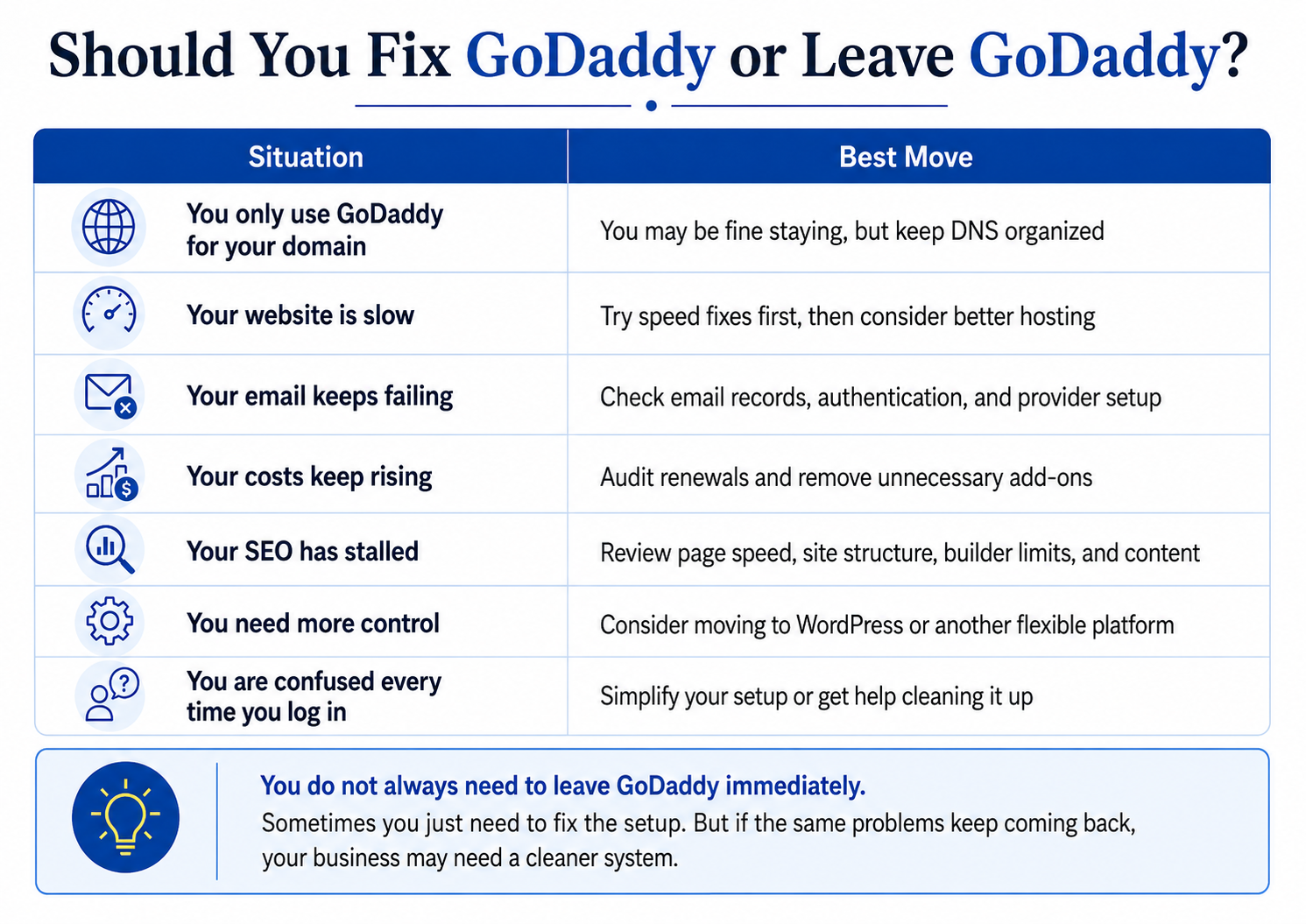
Should You Stay With GoDaddy or Move On?
GoDaddy can still work if:
You manage one simple site
Performance is not critical
You actively manage settings
It may be time to leave if:
SEO growth has stalled
Your site feels slow
Costs keep rising
Support is frustrating
How to Migrate Away From GoDaddy Safely
Move hosting first
Update DNS carefully
Test email before switching
Keep backups at every step
A slow, careful migration avoids downtime.
Final Thoughts: Avoiding GoDaddy Mistakes Moving Forward
Running into problems with your website is frustrating. Running into the same problems over and over is expensive.
The truth is that most issues people blame on SEO, digital marketing, or even bad luck usually come back to simple setup mistakes. Cheap hosting that cannot keep up. Security that should be standard but is locked behind add-ons. Email systems that quietly fail. Dashboards that make small changes risky. Over time, those issues stack up and slow everything down.
If you are using GoDaddy, none of this means you made a bad decision. It just means your business may have outgrown the platform or the way it was originally set up. That happens more often than people realize.
The good news is that every mistake covered in this article has a fix. Sometimes that means upgrading or cleaning up what you already have. Sometimes it means moving to tools built for performance, reliability, and growth. The key is knowing what is actually holding you back instead of guessing.
A website should feel like an asset, not a liability. When hosting, email, security, and SEO are working together, growth gets easier. Fewer fires. More clarity. Better results.
Start by auditing your setup. Fix the obvious problems. Then make decisions based on where you want your business to be, not where it started.
FAQs: Common GoDaddy Mistakes
Is GoDaddy bad for small businesses?
Not inherently. It is often just not the best long-term fit.
Can GoDaddy hurt my SEO?
Indirectly, yes. Slow speed, poor setups, and limited control can hurt rankings.
Is it hard to leave GoDaddy?
With planning, no. Most issues come from rushed migrations.
What are the most common GoDaddy mistakes?
Hosting choice, security add-ons, email issues, and billing confusion.
What are the biggest GoDaddy problems?
The biggest GoDaddy problems usually include slow website speed, confusing DNS settings, email issues, surprise renewals, too many add-ons, limited website builder flexibility, and weak SEO control.
Why is my GoDaddy website so slow?
A GoDaddy website may be slow because of shared hosting, large images, heavy themes, too many plugins, poor caching, or a website builder setup that is not optimized for speed.
Why does my GoDaddy email keep having problems?
GoDaddy email problems can come from incorrect MX records, missing SPF, DKIM, or DMARC records, spam filtering issues, syncing problems, or confusion between email hosting and website hosting.
Does Schulze Creative help fix GoDaddy issues?
Yes. We regularly audit, clean up, and migrate GoDaddy setups for growing businesses.
