
GoDaddy vs WordPress Hosting: Which Should You Choose?
TL;DR – GoDaddy vs WordPress Hosting
GoDaddy is simple and fast – ideal for beginners or small, static websites.
WordPress is flexible and scalable – perfect for growing businesses, blogs, and eCommerce stores.
Design & customization – WordPress offers unlimited options; GoDaddy is limited to templates.
SEO & marketing tools – WordPress wins for advanced optimization and integrations.
Long-term growth – Choose GoDaddy for speed and ease, WordPress for control, growth, and future-proofing.
Building a website isn’t just a checkbox on your to-do list; it’s the foundation of your business online. Over 40% of websites worldwide run on WordPress, while millions of small businesses rely on GoDaddy’s website builder to get online fast. But here’s the thing: not all platforms are created equal. Some will grow with your business, others will slow you down, frustrate you, and cost more than you expected.
I’ve helped dozens of business owners navigate this choice. I’ve seen sites launched on GoDaddy that never outgrew their templates, and WordPress sites that exploded in traffic and sales because the right tools were in place. The difference isn’t just tech, it’s strategy. In this guide, I’ll break down exactly what you get with WordPress and GoDaddy, where each shines, where they fall short, and how to pick the platform that actually fits your business goals.
By the end, you won’t just have a comparison, you’ll have a plan. A clear, actionable roadmap to get your website working for you, not against you.
What is GoDaddy vs WordPress?
Before we dive into the differences, let’s clarify what each platform actually is.
What is WordPress?
WordPress.org is a content management system (CMS) that powers over 40% of the web. It’s open-source, which means anyone can use it and customize it freely. You can host WordPress on any server, and it supports everything from simple blogs to large eCommerce stores.
Key Features of WordPress:
Unlimited customization with themes and plugins
Built-in SEO tools (and even more via plugins like Yoast or RankMath)
Scalable for growing businesses
Full control over your website
What is GoDaddy?
GoDaddy is primarily a domain registrar and website hosting company that also offers a drag-and-drop website builder. It’s designed for simplicity, so you can have a site online fast, even if you don’t have coding experience.
Key Features of GoDaddy Website Builder:
All-in-one hosting, domain, and website builder
Beginner-friendly setup
Templates and pre-built sections for fast design
Built-in security and support
TL;DR: WordPress gives you full control and flexibility. GoDaddy makes things simple and fast, but with limits.
Ease of Use: GoDaddy vs WordPress
GoDaddy: Beginner-Friendly Setup
If you’re not tech-savvy, GoDaddy is a lifesaver. You can:
Pick a template
Drag and drop elements
Have a website live in a few hours
No hosting configuration, no installing plugins, no worrying about updates—GoDaddy handles most of it for you.
WordPress: More Setup, More Control
WordPress requires a few more steps upfront:
Choose a hosting provider (like Bluehost, SiteGround, or WP Engine)
Install WordPress (many hosts do 1-click installs)
Pick a theme and plugins
Yes, it takes a little more time, but the trade-off is total control over your site’s design, features, and growth potential.
I’ve helped clients migrate from GoDaddy to WordPress because they started simple but quickly outgrew the limitations of the builder.
Design and Customization
When it comes to look and feel, here’s the breakdown.
WordPress Design Freedom
Thousands of free and premium themes
Plugins to add almost any feature imaginable (forms, popups, membership areas, etc.)
Ability to customize every page element
Basically, if you can imagine it, WordPress can probably do it.
GoDaddy Design Simplicity
Drag-and-drop builder with templates
Limited design customization outside of template sections
Best for small, simple sites or one-page websites
Case Study: One client wanted a simple informational site for their local service business. GoDaddy was perfect; it got them online quickly without headaches. But another client needed an eCommerce store with custom checkout flows. WordPress was the only platform that could handle it without hacks or workarounds.
Performance and Security
Hosting and Speed
WordPress: Speed depends on your hosting provider. Managed WordPress hosts offer caching, updates, and faster servers.
GoDaddy: Hosting is built-in, and uptime is generally reliable for small websites, but larger sites may feel slower as traffic grows.
Security
WordPress: You’re responsible for updates, backups, and security plugins. Managed hosts make this easier.
GoDaddy: Automatic updates, SSL certificates, and daily backups are included.
WordPress is more flexible but requires some tech know-how for security. GoDaddy is hands-off.
SEO and Marketing Tools
WordPress SEO Advantages
Use plugins like Yoast SEO or RankMath
Customize meta titles, descriptions, and site structure
Integrate Google Analytics, Facebook Pixel, and other marketing tools
GoDaddy SEO
Basic built-in SEO tools
Limited integration with third-party marketing tools
Works fine for small sites, but may limit advanced optimization
For business owners looking to rank in Google long-term, WordPress is usually the better choice because of SEO flexibility and integrations.
eCommerce Capabilities
WordPress + WooCommerce
Full-featured online store support
Flexible checkout, shipping, and tax rules
Thousands of plugins for inventory, marketing, and payment processing
GoDaddy eCommerce Plans
Simple online stores included
Limited customization
Good for small shops but not ideal for scaling
Case Study: A local retailer started on GoDaddy with 20 products. When they hit 200 products and needed advanced shipping rules, we migrated them to WordPress + WooCommerce. The transition allowed them to expand without limits.
Pricing and Value
WordPress Costs
WordPress itself is free
Hosting: $5–$40/month depending on provider
Premium themes and plugins: $0–$200+
GoDaddy Costs
All-in-one plans $10–$25/month
Built-in hosting, templates, SSL included
Fewer hidden costs for beginners
GoDaddy is simpler and predictable. WordPress can be cost-effective but may require budgeting for plugins and premium hosting.
Support and Community
WordPress
Massive global community
Forums, tutorials, and documentation
Professional support often comes from hosts or third-party developers
GoDaddy
24/7 customer support
Dedicated phone and chat support
More “hands-on” for beginners
If you like self-learning and customizing, WordPress communities are unmatched. If you want someone to guide you every step, GoDaddy excels.
GoDaddy vs WordPress Pros and Cons
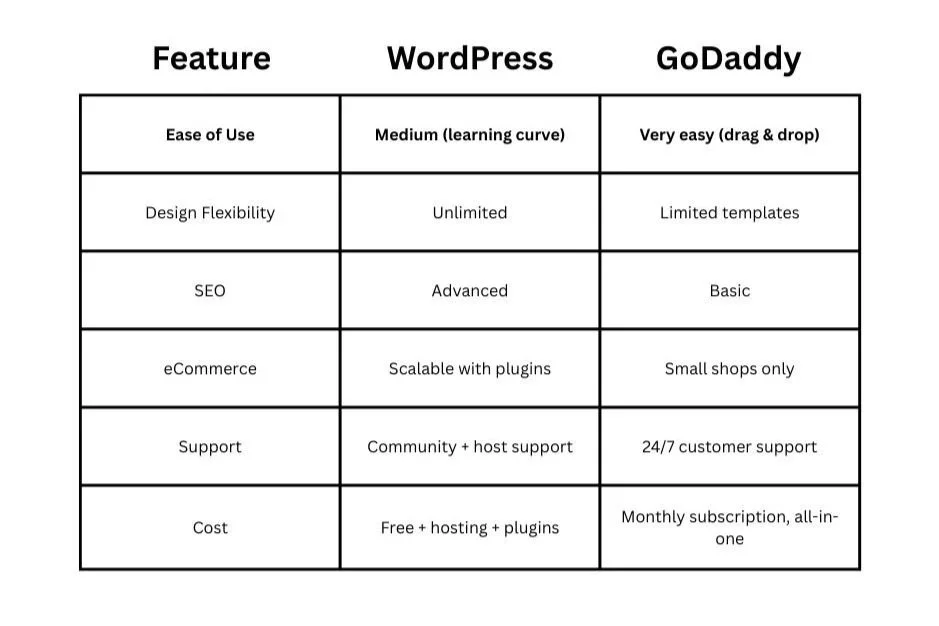
Who Should Use Which?
GoDaddy: Beginners, local businesses, informational or simple sites, anyone who wants speed and simplicity
WordPress: Bloggers, eCommerce stores, growing businesses, sites that need full customization or scalability
Rule of Thumb: Start simple if you must, but plan for the future. Many business owners I’ve worked with start on GoDaddy and eventually move to WordPress as their needs grow.
Actionable Advice for Choosing
Define your goals: Are you building a blog, store, or portfolio?
Consider your growth: Do you plan to scale your business online?
Evaluate your budget: Factor in hosting, themes, plugins, and time investment.
Think long-term: A platform that fits your needs now may not grow with your business.
Final Thoughts: GoDaddy vs WordPress Hosting
Choosing between GoDaddy vs WordPress Hosting isn’t about picking the “best” platform in a vacuum; it’s about picking the one that fits your business, your goals, and your growth plans. GoDaddy gives you simplicity, speed, and a hands-off approach that gets you online fast. WordPress gives you flexibility, scalability, and control that can grow with your business over time.
In my experience, the businesses that succeed online are the ones that think long-term. They start with a platform that fits their current needs, but they also plan for growth, customization, and marketing potential. Whether you start simple on GoDaddy or invest in WordPress from the get-go, the key is making informed decisions that align with your strategy. And I’ll be honest, I prefer WordPress.
Remember: your website should work for you, not the other way around. Make it a tool that drives growth, engages your audience, and sets your business apart. And if you’re feeling stuck or unsure which path to take, professional guidance can save you time, money, and headaches. At Schulze Creative, we help business owners navigate these choices and build websites that actually deliver results.
Your next step? Decide your priorities, plan for the future, and take action. Your website is waiting, and it’s ready to work as hard as you do.
FAQs About GoDaddy vs WordPress Hosting
Which is better: GoDaddy or WordPress Hosting?
It depends. If you want simplicity and fast setup, GoDaddy is great. If you want flexibility, scalability, and SEO control, WordPress is the better long-term choice. My choice: WordPress.
Can I migrate from GoDaddy to WordPress?
Yes. Many business owners start on GoDaddy and migrate to WordPress when their site grows. It’s usually straightforward, especially with a professional or a migration plugin.
How much does WordPress Hosting cost compared to GoDaddy?
WordPress can range from $5–$40/month for hosting, plus optional plugins/themes. GoDaddy is $10–$25/month for an all-in-one plan.
Do I need technical skills to use WordPress?
Some basic skills help, but many managed WordPress hosts make setup and maintenance easy. GoDaddy is better if you want zero technical hassle.
Can Schulze Creative help me decide?
Absolutely. At Schulze Creative, we’ve helped countless business owners pick the right platform, migrate sites, and optimize their online presence. We can guide you whether you’re starting on GoDaddy or WordPress, ensuring your website fits your business goals.
What if I need eCommerce functionality?
If you’re planning a store, WordPress + WooCommerce is usually the better choice. GoDaddy works for small shops but isn’t ideal for scaling or advanced features.
