
How Does GoDaddy Website Builder Work and Should I Use It?
TL;DR: GoDaddy Website Builder
Fast and beginner-friendly: Drag-and-drop editor and AI tools let you launch a website quickly.
Affordable, with free and paid plans: The free plan has limitations; paid tiers unlock custom domains, marketing, and e-commerce.
Good for simple websites: Ideal for small businesses, freelancers, and service-based businesses.
Limitations exist: Limited customization, template lock-in, and not ideal for large or complex sites.
Actionable next step: Use it to get online fast, or work with experts like Schulze Creative to optimize your website for growth and leads.
Building a website can feel like navigating a maze blindfolded. Every day, thousands of small business owners struggle to get online, wasting time, money, and energy on tools that don’t deliver. GoDaddy Website Builder promises a fast, simple solution. But does it actually work? Can it help you get leads, showcase your business, and stand out online, or is it just another flashy tool that leaves you frustrated?
I’ve spent hours diving into GoDaddy, testing its features, reading real user reviews, and comparing it to competitors like Wix and Squarespace. In this guide, I’ll show you exactly how it works, what it can really do, and whether it’s right for your business. By the end, you’ll know if GoDaddy Website Builder is a shortcut to growth or just a detour.
What Is GoDaddy Website Builder?
GoDaddy Website Builder is a tool that lets you create a website without needing coding skills. Think of it as a drag-and-drop platform where you can choose templates, add your content, and get your website live quickly. It’s mostly aimed at small businesses, solopreneurs, and personal projects who want a fast, simple way to get online.
Some people confuse it with GoDaddy’s done-for-you website services, where the company builds your site for you. The Website Builder is the DIY option; you do the editing, but GoDaddy provides the platform, templates, and hosting.
Does GoDaddy Build the Website for You?
Short answer: No, unless you pay for their managed service.
GoDaddy offers two ways to get online:
GoDaddy Website Builder (DIY) – You pick a template, drag in your text and images, and GoDaddy hosts your site.
Managed Web Design Services – GoDaddy builds the site for you for an additional fee. This is more like a traditional design service.
Most small business owners start with the DIY Website Builder because it’s faster and cheaper.
Is GoDaddy Website Builder Good?
The real question: is it worth it? The answer depends on your needs.
Pros:
Super easy to use: Drag-and-drop editor makes it beginner-friendly.
Fast setup: You can go from zero to live in under an hour.
AI-powered design tools: GoDaddy Airo can automatically create page layouts.
All-in-one platform: Hosting, domain, and SSL included.
Marketing features: Basic SEO tools, email marketing, and social sharing built in.
Cons:
Limited customization: You can’t fully tweak every design element.
Template lock-in: Once you choose a template, moving to another one is tricky.
Performance issues: Some users complain that it’s slower than competitors.
Not for advanced websites: Complex e-commerce or custom features are limited.
Overall, if you want a simple, professional-looking site fast, it’s good. If you need a high-growth, highly customized site, you might want Wix, Squarespace, or WordPress.
Why Some People Say GoDaddy Website Builder Is Bad
No tool is perfect, and GoDaddy is no exception. A few pain points:
Limited flexibility: Templates are fixed, which can frustrate creative users.
Customer support issues: Some users report slow responses and upselling.
Speed complaints: Certain sites can load more slowly than expected.
Not ideal for scaling: If your business grows, the Website Builder may not keep up.
The key is understanding what you need. If speed and simplicity matter more than deep customization, GoDaddy might still be perfect for you.
GoDaddy Website Builder Pricing: How Much Does It Really Cost?
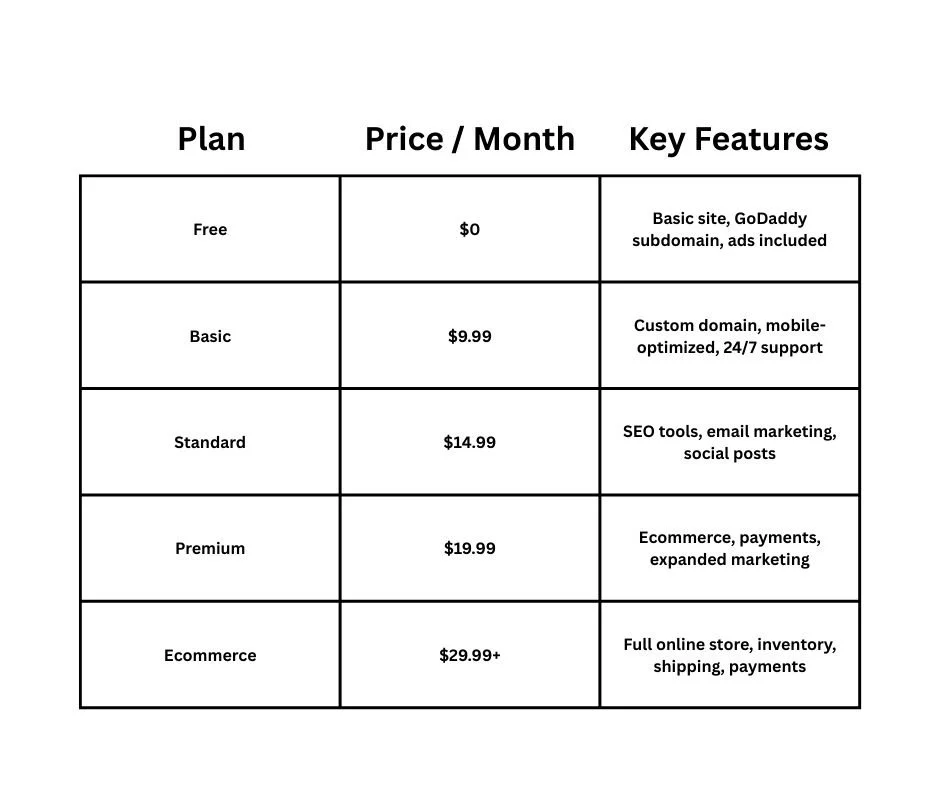
Pricing can be confusing, so let’s break it down through this comparison:
Tips:
Free is great for testing, but your domain will be like yoursite.godaddysites.com.
Paid plans unlock custom domains, marketing tools, and e-commerce features.
Expect renewal prices to be slightly higher than the first year.
Is GoDaddy Website Builder Free?
Yes, but with limitations. The free plan lets you:
Use a subdomain
Publish content online
Access some basic templates
The catch? You cannot use a custom domain, you’ll have GoDaddy ads, and advanced features are locked. Most businesses upgrade after testing.
How to Use GoDaddy Website Builder (Step by Step)
Here’s a simple guide to get your website live:
1. Create an Account
Go to GoDaddy Website Builder and sign up. You can start with a free plan or select a paid plan.
2. Choose a Template or Use AI
Pick a template that matches your business or let GoDaddy Airo generate a layout based on your business type.
3. Add Your Content
Replace placeholder text and images
Add pages like About, Services, and Contact
Customize colors and fonts to match your branding
4. Connect Domain & SSL
If you have a domain, connect it. SSL is included automatically, so your site is secure.
5. Preview & Publish
Check your site on desktop and mobile, then hit publish. Your site is live in minutes.
Key Features of GoDaddy Website Builder
Drag-and-Drop Editor
Move elements, add text, buttons, and images without coding.
SEO & Marketing Tools
Basic SEO tools let you optimize page titles, descriptions, and meta tags. You can also share directly to social media and send marketing emails.
E-commerce Features
Paid plans allow you to sell products, accept payments, manage inventory, and handle shipping.
Security & SSL
All plans include SSL certificates, so your visitors know your site is safe.
Is GoDaddy Website Builder Good for E-commerce?
It can work for small online stores, but it’s not Shopify-level. You can:
List products
Accept payments
Track inventory
Offer shipping options
If you plan to scale rapidly or need complex e-commerce features, you might hit limitations.
GoDaddy Website Builder vs Wix (and Other Alternatives)
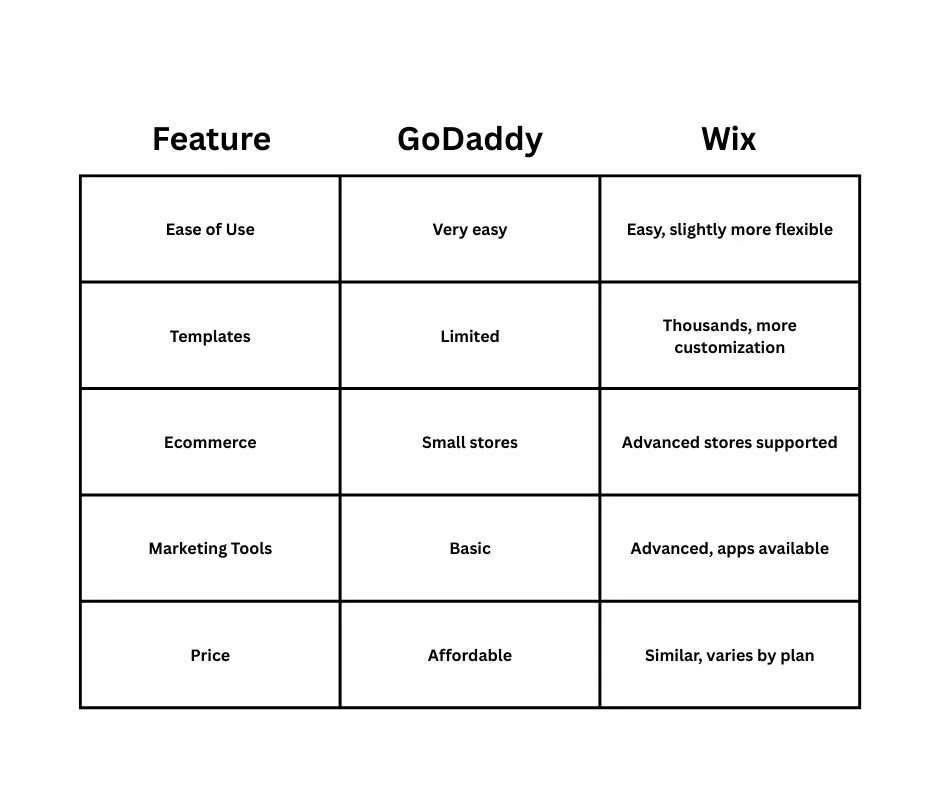
Many people ask: “Is GoDaddy better than Wix?”
Other alternatives include Squarespace (better design) and WordPress (better scalability).
What Happens If GoDaddy Website Builder Expires?
If your paid plan expires:
Your site will go offline
Content may still exist in your account
Free plan may be offered, but with ads and a GoDaddy subdomain
This is important if you rely on your website for business leads.
How to Remove or Disable GoDaddy Website Builder
Sometimes you want to move your site elsewhere. You can:
Disconnect your domain
Cancel the plan
Export content manually (limited options, some elements locked to GoDaddy)
Who Should Use GoDaddy Website Builder — and Who Shouldn’t
Best for:
Local service businesses
Freelancers and solopreneurs
Simple informational websites
Not ideal for:
Large ecommerce stores
Highly customized websites
Websites needing advanced SEO integrations
Final Verdict: Is GoDaddy Website Builder Worth It in 2025?
GoDaddy Website Builder works if you want a simple, professional site fast. It’s beginner-friendly, affordable, and integrates hosting, SSL, and basic digital marketing tools.
If you need advanced customization, scalability, or a large e-commerce site, consider other platforms.
Conclusion: GoDaddy Website Builder
At the end of the day, GoDaddy Website Builder is exactly what it promises to be: a fast, beginner-friendly way to get your business online. It’s easy, it’s convenient, and for small businesses looking to start simple, it delivers. But it’s not perfect; customization is limited, advanced features are locked behind higher tiers, and if you’re planning to scale, you may quickly outgrow it.
The real question isn’t whether GoDaddy can build a website. It’s whether it can help your business grow, attract leads, and convert visitors into customers. If you want a straightforward, professional-looking website in hours, it’s a solid choice. If your goals are bigger, more control, more features, more growth, then you might want to consider alternatives or work with a team like Schulze Creative to maximize the impact of your online presence.
No matter what, the most important step is to get your business online, share your story, and start connecting with your customers today. Don’t wait. Your audience is already searching for you.
FAQ: GoDaddy Website Builder
Is GoDaddy Website Builder easy to use?
Yes, it’s built for beginners. Drag-and-drop tools and AI templates make setup simple.
Can GoDaddy build my website for me?
Yes, but this is a separate paid service. The Website Builder is DIY.
How much does GoDaddy Website Builder cost?
Plans range from free to $29.99+ per month, depending on features like ecommerce, marketing, and custom domains.
Does GoDaddy Website Builder include SSL and email?
Yes, SSL is included. Email is included in higher-tier plans.
How do I remove GoDaddy Website Builder?
You can disconnect your domain, cancel your plan, or manually migrate content.
Can Schulze Creative help me with GoDaddy Website Builder?
Kind of. Schulze Creative helps small businesses optimize websites, improve branding, and integrate marketing strategies. We ensure your website converts leads into customers, rather than just looking nice. But we do not use GoDaddy Website Builder. We build all of our websites on WordPress and Squarespace.
Is GoDaddy Website Builder good for small businesses?
Yes, especially if you want a fast, low-cost, professional-looking site. It’s ideal for service-based businesses or personal brands.
