
Max Clicks vs Max Conversions: Which Google Ads Strategy Gets More Leads?
TL;DR: Max Clicks vs Max Conversions
Max Clicks gets traffic. Use it for new campaigns or when you have little conversion data.
Max Conversions gets leads. Google focuses on users most likely to convert.
Start with Max Clicks. Gather 15–25 leads to give Google enough data.
Switch to Max Conversions. Improve lead quality, ROI, and reduce wasted ad spend.
Track and monitor. Accurate conversion tracking and patience are key to success.
Google Ads can feel like a mystery sometimes. You set a budget, write your copy, and hope clicks turn into leads. But here’s the thing: not all clicks are created equal. Nearly 60 percent of small business ad spend goes to clicks that never convert. Crazy, right? I’ve seen businesses spend hundreds—sometimes thousands—on clicks that don’t bring a single phone call.
That’s where the choice between Max Clicks and Max Conversions comes in. One gets you traffic fast. The other focuses on actual leads. Picking the wrong one can waste money and cost you valuable customers. In this post, I’m going to show you exactly how each strategy works, when to use them, and the step-by-step approach I recommend: start with Max Clicks until you have 15 to 25 leads, then switch to Max Conversions to maximize results. By the end, you’ll know which approach gets more leads and how to make Google Ads work for your business.
What Are Google Ads Bidding Strategies?
Before we dive into Max Clicks and Max Conversions, it is important to understand what a bidding strategy is. In Google Ads, a bidding strategy tells Google how you want your budget to be spent. Are you focused on getting more traffic to your website, or are you focused on getting actual leads, calls, or sales? Choosing the right strategy aligns your ad spend with your business goals.
Google has many bidding options, but the two most common for small businesses are Max Clicks and Max Conversions. Knowing the difference and using them correctly can save you money and bring in more qualified leads.
Max Clicks: What It Is and How It Works
Max Clicks is the simpler of the two strategies. When you choose Max Clicks, Google tries to get you as many clicks as possible within your daily budget. It does not optimize for whether those clicks turn into leads or sales.
When to Use Max Clicks
Max Clicks works best for new campaigns that do not have much historical conversion data. It is also a good choice if you are testing keywords, learning which ads resonate with your audience, or just trying to get traffic to your website.
Pros of Max Clicks
Fast traffic to your website
Easy to set up
Helps gather data for future campaigns
Cons of Max Clicks
Traffic may not convert
Clicks cost money even if they do not result in leads
You cannot control the quality of traffic
For example, a small HVAC business testing a new set of keywords might start with Max Clicks to see which ads attract clicks. Once you gather enough leads, you can switch to a strategy that focuses on conversions.
Max Conversions: What It Is and How It Works
Max Conversions is more advanced. When you choose Max Conversions, Google uses machine learning to show your ads to people who are most likely to complete a conversion action. This could be filling out a form, calling your business, or making a purchase.
Requirements for Max Conversions
Max Conversions works best when you have accurate conversion tracking and some historical data. Google needs information about past conversions to predict who is likely to convert next.
Pros of Max Conversions
Higher quality leads
Better ROI
Focused on real business results
Cons of Max Conversions
Fewer clicks at first
Learning phase can temporarily reduce traffic
Requires proper conversion tracking
For example, once an HVAC business has a steady flow of 15 to 25 leads from a Max Clicks campaign, switching to Max Conversions can improve the quality of those leads and reduce wasted ad spend.
Max Clicks vs Max Conversions: A Comparison
Here is a simple comparison to help you see the difference.
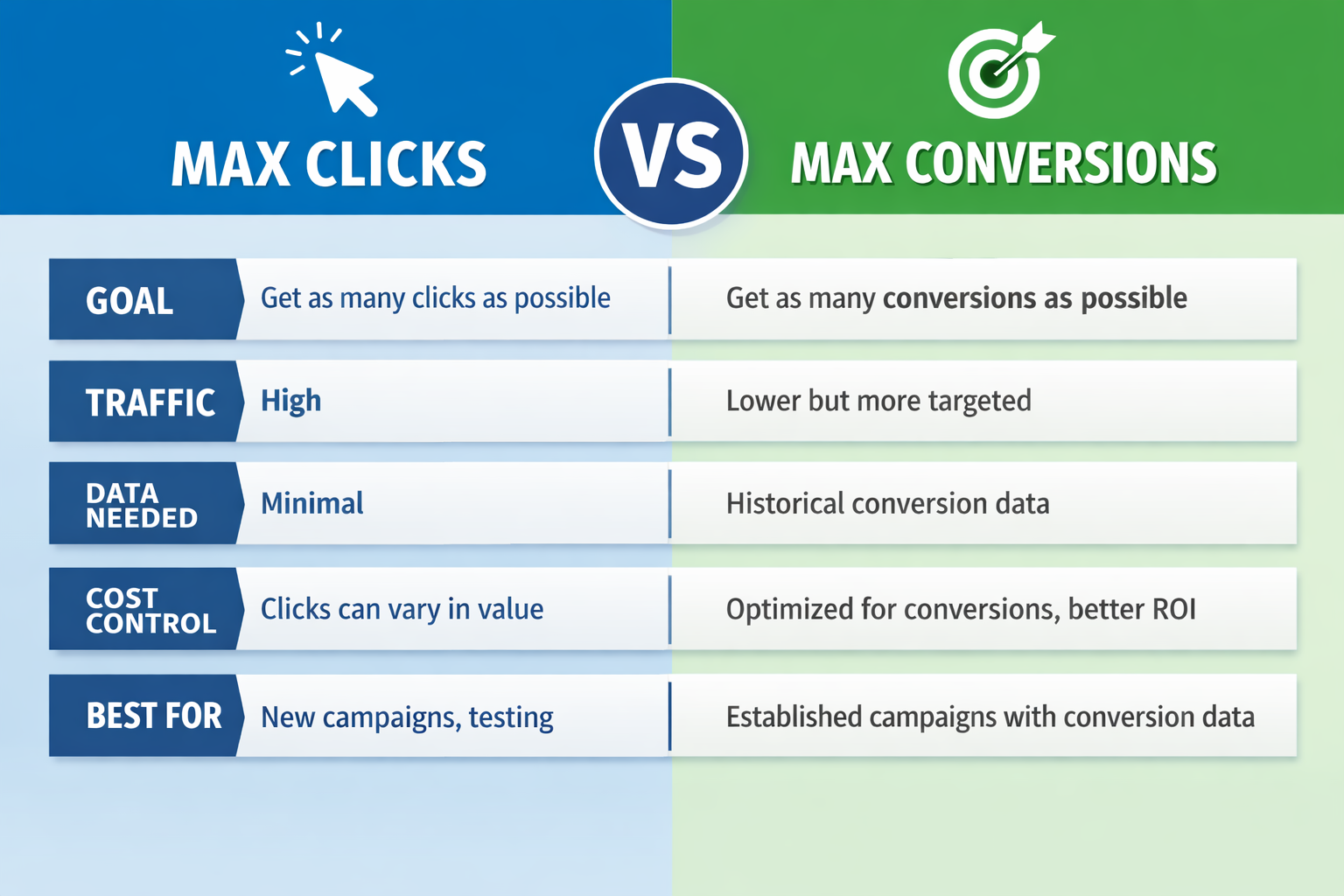
The key takeaway is that more clicks do not always mean more leads. Max Conversions focuses on people who are likely to take action, which is what every business wants in the long run.
How to Know Which Strategy is Right for You
Choosing the right strategy depends on a few simple questions:
Do you have conversion tracking set up?
Do you have enough historical data to inform Google?
Are you looking for traffic or real leads?
If you are just starting out or do not have conversion data, Max Clicks is the best choice. Once your campaigns have generated 15 to 25 leads and your tracking is accurate, it is time to switch to Max Conversions to maximize the quality of your leads.
How Much Data Do You Really Need to Switch?
You should have at least 15 to 25 leads before switching to Max Conversions. This gives Google enough data to understand which users are most likely to convert. Switching too early can cause lower traffic or wasted budget because Google has not learned which clicks are valuable.
What Happens When You Switch From Max Clicks vs Max Conversions
When you make the switch, your campaign enters a “learning phase.” During this time, Google tests who is most likely to convert. You may see fewer clicks initially and your cost per click may go up temporarily.
Tips for a smooth transition:
Make sure your conversion tracking is accurate
Do not panic if traffic drops initially
Monitor campaigns closely for the first few weeks
Adjust budgets if needed to maintain lead flow
Once the learning phase is over, your campaigns should produce higher quality leads and a better ROI.
Common Mistakes People Make
Here are common mistakes we see in Max Clicks vs Max Conversions campaigns:
Switching to Max Conversions too early
Not tracking conversions properly
Ignoring audience targeting
Not giving campaigns enough time to optimize
Avoiding these mistakes will make your transition smoother and increase your chances of success.
Tips for Running Google Ads
Test small changes with A/B ad experiments
Track conversions carefully, including form fills and calls
Focus on cost per lead, not just clicks
Keep refining keywords and ad copy based on results
Start with Max Clicks, then switch to Max Conversions when you have enough leads
Insights from Us
Small business owners often make the mistake of switching too early. We recommend starting with Max Clicks to gather data. Once campaigns have a steady flow of 15 to 25 leads, Max Conversions can improve lead quality and ROI.
Case Study
An HVAC company spending $50 per day on Google Ads.
Week 1-3: Using Max Clicks, they get 100 clicks and 10 leads.
Week 4: They reach 20 leads. They switch to Max Conversions.
Week 5-6: They get 60 clicks but 25 high-quality leads. Cost per lead is lower and these leads are more likely to book jobs.
This shows why starting with Max Clicks and switching to Max Conversions is effective for businesses with limited data.
Conclusion: Max Clicks vs Max Conversions
Choosing the right Google Ads strategy can make or break your lead flow. Max Clicks is perfect when you are just starting out or need more data, it gets traffic fast and helps you figure out what works. But traffic alone isn’t enough. Once your campaigns have generated 15 to 25 leads, switching to Max Conversions turns that data into real results, focusing on people who are most likely to call, fill out a form, or book your service.
By following this approach, you avoid wasting money on clicks that don’t convert and start getting more qualified leads from Google Ads. Start with clicks, collect the data, and then let conversions take over. It is simple, actionable, and proven to work for home service businesses and other small businesses alike. The key is patience, proper tracking, and knowing when to make the switch.
Your ads can finally work for you, not just for clicks, but for real business growth. If you are interested in starting Google Ads, book a free marketing consultation.
FAQs: Max Clicks vs Max Conversions
What is the difference between Max Clicks vs Max Conversions?
Max Clicks aims to get as many clicks as possible. Max Conversions aims to get as many conversions as possible using machine learning.
When should I switch from Max Clicks to Max Conversions?
Switch when your campaigns have generated 15 to 25 leads and your conversion tracking is accurate. This ensures Google has enough data to optimize effectively.
Will I get fewer clicks if I switch to Max Conversions?
Yes, initially. The learning phase may reduce traffic, but the leads you get are more likely to convert.
Do I need conversion tracking to use Max Conversions?
Yes. Without proper tracking, Google cannot optimize bids for conversions.
How does Schulze Creative help with Max Clicks vs Max Conversions?
At Schulze Creative, we help businesses set up conversion tracking, run effective Google Ads campaigns, and know when to switch strategies. We focus on turning clicks into real leads that grow your business.
Can Schulze Creative help my HVAC or home service business get more leads?
Yes. We design personalized digital marketing campaigns tailored to your business goals, track conversions accurately, and optimize bidding strategies so you get more calls and booked jobs.
